Sim Lim
Square has a reputation of being one of two major digital malls in Singapore
for all kinds of cutting-edge electronics products. In its heyday of the 90s
and early 2000s, it has always differentiated itself from Funan IT Mall by being
grittier and more supportive of the DIY culture, as well as being quicker to
embrace new products and technology. However, that also became its Achilles Heel,
in a way making Sim Lim more susceptible to major changes in the market, and
being significantly impacted by the change in technology away from customized PCs
and laptops, towards tablets and smartphones. After-all, how much hardware DIY
can you really perform on the iPad, iPhone or Android products?

Image courtesy of Wikipedia
For a short
while in the late 2000s, it tried to ride the wave of tablet and smartphone
accessories, but with high rentals and pricey parking, it did not really have
any competitive edge over the neighbourhood stores or any of the online
portals.
Curious
about how it was faring now, and keen to see how much Xiaomi has penetrated
this digital mecca, I decided to make an independent field trip to investigate.
Level 1: OPPO Find 7A spotted; strong Xiaomi
competitor
 After a
brisk walk through the central façade to gaze at the latest accessories, I was
a little disappointed not to spot any Xiaomi product. My attention was caught
by a prominent presence of an up-and-coming Xiaomi competitor, the OPPO Find 7
and 7A! I took a brochure to scan at the specs; OMG, 4G LTE on the OPPO 7A at a
price point of $599! (Note: M1 is offering it as $168 on the LiteSurf+ plan)
After a
brisk walk through the central façade to gaze at the latest accessories, I was
a little disappointed not to spot any Xiaomi product. My attention was caught
by a prominent presence of an up-and-coming Xiaomi competitor, the OPPO Find 7
and 7A! I took a brochure to scan at the specs; OMG, 4G LTE on the OPPO 7A at a
price point of $599! (Note: M1 is offering it as $168 on the LiteSurf+ plan)
From the shop owned by the Song brothers
I was
particularly interested in the Oppo Find 5 as this is one of the supported
models for the MIUI V5 ROM. However, I did not see it on display. I was however
able to run through all the OPPO display models N1, R1, Find 5 Mini and Find 7A and came away very impressed
with the screen sharpness and camera of the Find 7A.

Brochure from Level 1
Level 3 – Redmi Note spotted
I hit the
Xiaomi jackpot on this level!
I was very excited to see the Redmi Note 1W on display running the China WCDMA ROM.
The shop was also selling a range of other products and the Xiaomi parallel imports were tucked in the corner next to the android TV boxes. The salesman is from China and he was very busy trying to sell a TV box to an uncle who wanted to be very sure that he could watch HK drama series on the box (He was still there an hour later when I re-visited the shop). As a result, all I could do was to ask about the price, which was $279. I did not bargain as I was not going to buy it. The Redmi Note seemed authentic under the Settings page, running on JHDCNBA with 2Gb RAM and 8Gb Storage.
I was very excited to see the Redmi Note 1W on display running the China WCDMA ROM.
The shop was also selling a range of other products and the Xiaomi parallel imports were tucked in the corner next to the android TV boxes. The salesman is from China and he was very busy trying to sell a TV box to an uncle who wanted to be very sure that he could watch HK drama series on the box (He was still there an hour later when I re-visited the shop). As a result, all I could do was to ask about the price, which was $279. I did not bargain as I was not going to buy it. The Redmi Note seemed authentic under the Settings page, running on JHDCNBA with 2Gb RAM and 8Gb Storage.
Next, I
investigate another shop on the same level that was offering many smartphones
and tablets from China. The focus seemed to be on Ainol 艾诺 tablets. I did
not notice any Mipads...yet.
Level 4: Some Xiaomi phones, but watch out for
Coolpad 4G LTE!
 On this
level, there was another shop selling many PRC gadgets and the Xiaomi phones
were prominently displayed. I could try out the Mi3 and Redmi phones on
display. However, I could not understand why anyone would be interested in
these models which can be purchased directly from the official Xiaomi website
at very competitive prices. I guess they must be targeting the tourist market.
On this
level, there was another shop selling many PRC gadgets and the Xiaomi phones
were prominently displayed. I could try out the Mi3 and Redmi phones on
display. However, I could not understand why anyone would be interested in
these models which can be purchased directly from the official Xiaomi website
at very competitive prices. I guess they must be targeting the tourist market.
However it is
clear that Xiaomi has overturned the market for smartphones because there are
now many models offering dual-sim. I have even seen a triple sim smartphone
from Lenovo (i think)!
Of the ones
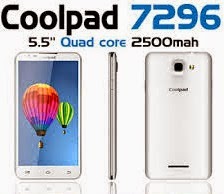
on display, I was drawn to the Coolpad 7296 on display, because this model is supported by the MIUI V5 ROM. Unfortunately, the listed price was $199,
which I felt was not competitive compared to the Redmi. However, there could be
room for further bargaining.
Coolpad 酷派is a very well-known PRC smartphone manufacturer (3rd largest in China), who is venturing into 4G LTE. In my opinion, they are not as Cool酷 as Xiaomi - You can check out their website (especially the homepage) here and decide for yourself.
Coolpad 酷派is a very well-known PRC smartphone manufacturer (3rd largest in China), who is venturing into 4G LTE. In my opinion, they are not as Cool酷 as Xiaomi - You can check out their website (especially the homepage) here and decide for yourself.
Their
next generation of products hitting the market appear to be very
impressive. In particular the Coolpad K1 promises dual sim 4G LTE on a 5.5 inch
screen. There is also the Coolpad Halo with a 7 inch display and dual sim 3G.
Xiaomi has
to keep up with 4G LTE!
If you are
keen, you can also try out the less well-known brands such as THL (糖葫芦) and Ulefone
(欧乐风). Some of their models are officially supported by Miui V5 ROM.


Huawei
phones are pretty mainstream now, hence I did not check them out. They are
easily available.
The
unofficial ROMs for Huawei, THL and Ulefone are listed in the MIUI forum thread here.
Level 4: Xiaomi Accessories.
I finally
made a stop at one of my favourite accessory stores on Level 4. This accessory
store on level 4 has all sorts of phone covers and casings. However, the sales lady led
me to a rather small selection of casings for Redmi, Redmi Note and Mi3. The
casings range from $10 for the silicone cases, $15 for the cases with covers, and $25 for the metallic ones. Unfortunately, I did not see any oem replacement
back covers for Redmi. You will easily obtain a better selection from Taobao.
At another
store, I saw some Xiaomi powerbanks and Xiaomi piston earphones. I could not tell
for certain whether they were authentic, but they seemed poorer in make quality compared
to those I have purchased from the Mi store during the Singapore online sales.
Xiaomi will face a strong challenge: China smartphones
gaining traction
Xiaomi’s
presence was not strongly felt at Sim Lim, but overall, I felt that Xiaomi is leading a wave
of better quality Chinese phones that has transformed the local smartphone
market for the benefit of consumers. Sim Lim Square has seen its heydays, and
only time will tell if Steam OS consoles and other smartphone technological innovations to
come will bring back the crowds to this venerable mall.
Note: All logos in this article are provided for illustrative purposes and belong to the respective copyright of the owners.