Tuesday, January 24, 2012

Dual simcard capability for iPhone 4: Unique iPhone battery case from 2phone


Many business travelers often need to be contactable on 2 mobile numbers: 1 local number for their business clients and another personal number for family and friends. Until now, this means having 2 phones and the constant need to make sure that contacts are transferred from one phone to another, or having to forward messages from one phone to another.

The 2phone dual sim case is a very neat solution that is offered by a website linked to the well-known iPhone accessory maker, the QYG group. This iPhone case not only protects the iPhone, but also has its own full size simcard slot that allows the iPhone to operate a second mobile line SIMULTANEOUSLY. And i mean complete voice and text messaging functionality for the second simcard.


The iPhone is able to run two mobile lines simultaneously with the 2phone case.


The 2phone app is where voice calls and messaging can be made using the 2nd simcard. The settings for the 2nd line is also accessed from this menu. The menu interface has been thoughtfully designed to have the same outlook as the iPhone's call app.

The 2phone case also has its own separate 800mAh battery that can serve as an emergency battery charger for the iPhone. The catch is that this accessory requires the phone to be jailbroken because the 2phone cydia app is required in order to install the 2phone voice call and text app.


2phone case comes with an internal replaceable battery and extra simcard slot for a 2nd line. It also has a free simcard tray pin and mini simcard adaptor that neatly sits within the case.

During testing with my iPhone 4 running iOS 5.0.1 (jailbroken with redsnow), I found that the voice and text messaging capability works smoothly as advertised. The ringtone for the second line can be set differently from the main line so that you can immediately identify whether an incoming call or sms is coming through the main or second line.


2phone settings allows the user to set a different ring/text tone for the 2nd simcard.

However, I found that there is added battery drain on the iPhone due to having 2 lines operating at the same time. With my usage profile (with about 50-100mb of data usage per day, checking email throughout the day, making about 5-10 calls and 5-10 sms per day), I found that I could be low on battery by the evening. The added battery capacity of 800mAh also proves to be insufficient at times as it will only charge the iPhone if it has more than 50% of charge remaining. In practice, this means that it will only charge about 10-20% of the iPhone.

Battery issues aside, I found that the added convenience (and in my case, necessity whenever I am overseas) of having 2 lines on my iPhone turns out to be a game-changer. I can now easily buy a local simcard while overseas for making local calls while retaining the use of my own simcard for any calls from home. I can now use both at the same time without worrying about missing calls or sms from either line. Since the 2phone app is able to access the iPhone contact book, there is also no need to maintain two separate contact lists on separate phones. The build quality of the case is good and does not add much weight or bulkiness to the iPhone. It is similar in size to the Mophie Juice Pack Air but slightly lighter at 59 grams.


iPhone 4 with 2phone case.

The 2phone is available in Singapore for about S$99. The international model is FM-01A.


The 2phone packaging is basic but provides the key specifications at the rear.


The specifications are clearly shown.

The 2phone official website can be found here. I bought mine at Sim Lim Square.

Update 1:

This is what an incoming call would look like using the 2phone and a second simcard:

Sunday, December 18, 2011

How to transfer pdf to iPhone without iTunes


1. Download ifunbox.

2. Use the Copy from PC button to browse for the pdfs and copy to the iphone's ibooks directory under 'private/var/mobile/media/books'.

3. Open iFiles (purchase from Cydia) and navigate to the abovementioned directory. iFiles will give you the option to open the pdf using iBooks. From thereon, the pdf will always be displayed on the iBooks bookshelf. No need to go through iTunes.

Friday, December 2, 2011

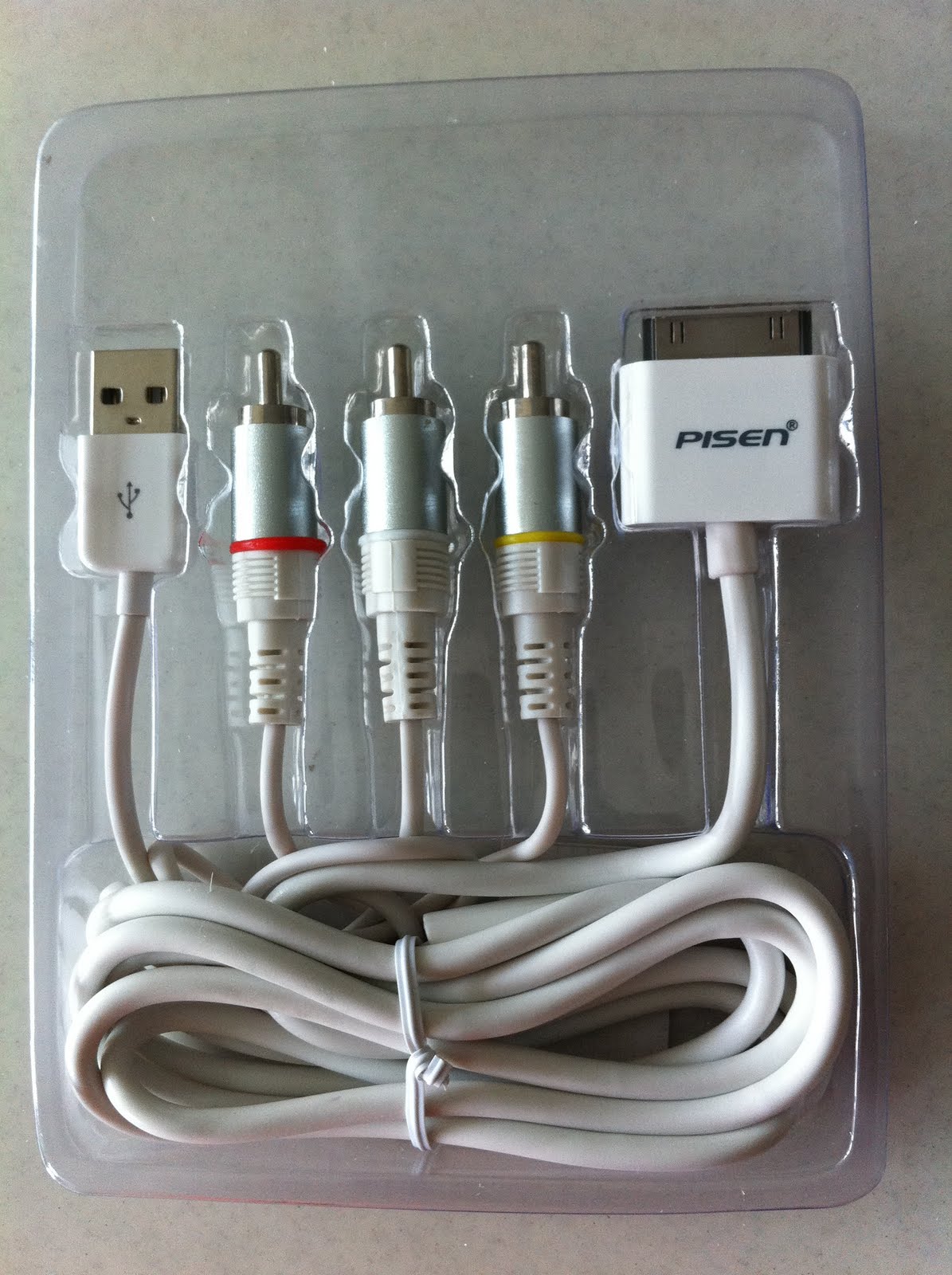
Connecting iDevices to the TV: an Apple-compatible AV Cable accessory from Pisen (品胜)


Some of us would like to connect a 1st Generation iPad or 3rd/4th generation iPod to display on a bigscreen LCD or LED TV, especially if this allows family and friends to watch Youtube and other streaming videos together, or be an active audience during an Angry Birds session. This feature, known as display mirroring, though incorporated by Apple from the iPad2 onwards, was not meant to be ready for the older devices, and is still not a fully supported feature on the older devices.

Jailbreaking your older devices will however unlock this feature, through the installation of free Cydia apps such as TVOut and TVOut2. The Pisen (品胜) AV Cable, developed by the Guangdong Pisen Electronics Co Ltd is one of the third-party accessories in the market that is affordable and at RMB 165 (approx. SGD 35) significantly cheaper than the official Apple adapter.


The Pisen AV cable is meant for connecting iDevices to any TV or Monitor via the older AV connectors (Red-Yellow-White). It also comes with a usb connector that works with the official Apple plug, thus allowing the iDevice to be simultaneously charging while connected to the TV. This is a critical feature because users do not have to worry about running low on battery midway through a movie. The Pisen AV cable can also be used in place of the default Apple charging cable so that users who are travelling, do not have to bring along two sets of cables.


The main design shortcoming of the Pisen AV cable is that the cable for the usb connector is very short. Hence the power plug will have to located very close to the AV connections in order for charging and display mirroring to take place at the same time.


In my test session, after connecting the iPad 1st Gen to the TV, I had to run the TVout app in order to configure the iPad to display properly on the TV in the correct aspect ratio. This was easily done.

After setting-up all the connections, the Springboard and LeTV mirror well on the LCD TV. The audio was also working properly.


The Pisen AV cable is a useful accessory that can revive your older iDevices that have been made obsolete by the newer iPad 2 and iPhone 4S. Given the proliferation of streaming apps such as w.tv, Hulu+, Netflix and LeTV, the older iDevices that have been jailbroken, can serve as portable media players at home. At SGD 35, this is an affordable accessory and an interesting device for all enthusiasts.

The manufacturer, Guangdong Pisen Electronics Co Ltd 广东品胜电子股份有限公司 (www.pisen.com.cn) is an established manufacturer of Apple accessories, including portable battery chargers. Their products appear to be well made and packaged. We will likely continue to see more of their accessories in time to come.

Tuesday, November 15, 2011

Top 10 Educational Apps for Toddlers and Pre-schoolers


1. iPlay&Sing

 Category: Learning Music
 User Ratings : 4 stars out of 5
 iPhone App, Free
 Developer: Penrillian

Description: App uses an onscreen piano with keys highlighted in sequence for the child to tap out familiar nursery tunes. It is kind of like a really slow-paced Guitar Hero, with a piano, and no scoring.


2. Baa Baa
 Category: Learning about Shapes, Colours and Words
 User Ratings: 4 stars out of 5
 iPhone App, $1.99
 Developer: Duck Duck Moose

Description: Child can drag and drop various shapes into their matching slots. Most of us probably have come across these shape toys, usually made out of wood. Now we don’t have to find them strewn everywhere with this app.


3. SingSing ABC
 Category: Animated Flash Cards
 User Ratings: 3 stars out of 5
 iPhone App, $0.99
 Developer: Ninewheels Co Ltd

This category of apps is the ‘low hanging fruit’ of educational apps for toddlers. Relatively easy to develop because the concept is straightforward – take the traditional flash card-based learning system, add in snazzy graphics (sometimes animated but not in this app), put up on the appstore, repeat.
Again, another useful app that will save parents time and effort from picking up cards strewn all over the floor.


4. Word Magic
 Category: Learning 1st Words
 User Ratings: 4 stars out of 5
 Universal App, $0.99
 Developer: Anusen Inc

Description: This is Hangman for toddlers with only 1 or 2 missing alphabets. And since it is for toddlers, you get the picture clue as well. Toddlers are really excited about this one.

5. Bob Books Reading Magic #2, Bob Books Reading Magic #2 HD
 Category: Learning 1st Words
 User Ratings: 4 stars out of 5
 iPhone, $1.99; iPad, $3.99.
 Developer: Closure Associates

Description: This is tougher than Word Magic. The kid will have to assemble whole words from the jumbled-up alphabets. Parents will be pretty excited when their kids unexpectedly complete their first difficult word, words like 'iphone'.


6. Shape Builder
 Category: Learning about Shapes
 User Ratings: 4 stars out of 5
 iPhone, $0.99.
 Developer: Darren Murtha Design

Description: Drag and drop shapes into matching slots. This is one of the early educational apps that have been in the appstore since 2009. Probably one of the first apps that kids would be interested in.


7. I Write Words
 Category: Tracing Alphabets
 User Ratings: 4 stars out of 5
 Universal App, $2.99.
 Developer: gdiplus

Description: Tracing alphabets and numbers onscreen is another concept that is tailor-made for iPhones and iPads. Also available in Spanish and French.


8. Teach Me 1st Grade or Teach Me Kindergarten or Teach Me Toddler
 Category: Learning about Addition, Subtraction and Spelling.
 User Ratings: 4 stars out of 5
 Universal App, $0.99.
 Developer: 24x7 DigitalLLC

Description: This app allows several kids to create their own accounts within the same app so that they can complete the lessons at their own pace. It is in the Question-Answer learning format and covers Addition, Subtraction and Spelling. For older preschoolers who can read.


9. Fish School
 Category: Animated Flash Cards for Alphabet, Numbers, Shapes and Colours.
 User Ratings: 3.5 stars out of 5
 iPhone or iPad, $1.99
 Developer: Duck Duck Moose

Description: Schools of fish swim in tight formations that look like Alphabets, Numbers, Shapes. Sometimes all of them have the same colour. You get the idea.


10. 123 Kids Fun Games
 Category: Animated Flash Cards for Alphabet, Sounds, Numbers, Animals.
 User Ratings: 3 stars out of 5
 Universal App, $2.99.
 Developer: RosMedia

Description: Another app that uses animated flash cards for learning. Probably needs a better app name rather than one that is made for search engines.

Monday, November 14, 2011

Angry Birds Humour


LOL. I've actually gotten pretty bored of Angry Birds as a game. Cat Physics and Where's my Water are better and more engaging IMHO.

As a phenomena, Angry Birds has been very interesting and certainly proves that first movers have a huge advantage in the app market.

Sunday, October 9, 2011

Steve Jobs (February 24, 1955 – October 5, 2011)


Thanks to Jonathan Mak from Hong Kong, this is the most befitting logo for the man who is at the core of this blog.

As Jon Stewart puts it aptly: "We won't see the likes of him for quite some time."

Friday, October 7, 2011

When will the iPhone 4S be launched in Singapore?


The iPhone 4S will be launched in Singapore on 28 Oct 2011.